
Stylized Water 3 - Underwater Rendering (Extension)
6.Audio

An Underwater Area component already tracks if the bottom of the screen is below/above the configured water level. This same information can be used to drive a Low-Pass filter on an Audio Mixer.
This type of filter can create the typically muffled audio effect commonly associated with underwater environments. To ensure that this filter does not affect other audio channels, such as music, UI sounds or dialogue, it’s required to make use of Audio Mixers.
This functionality requires a bit of set up that unfortunately cannot be automated.
Project setup
- Create a new
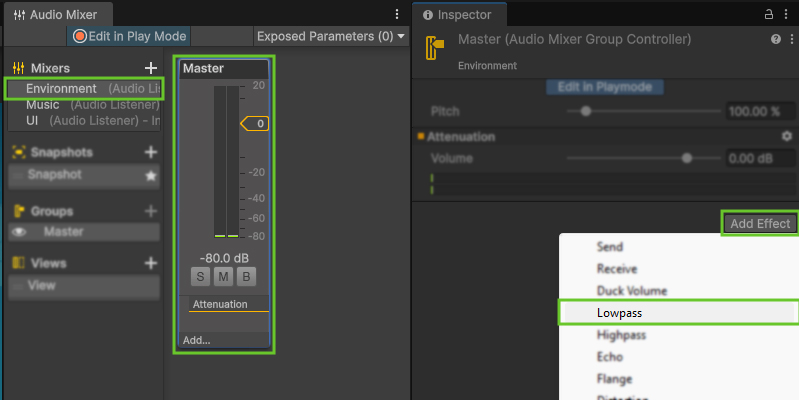
Audio Mixerfor environmental sounds. In the project window right-click and Create->Audio->Audio Mixer. (I’ve named it “Environment”) - Double-click to open it in the Audio Mixer panel.
- Select the Master channel in the audio mixer
- Add a
Lowpasseffect
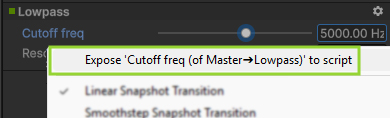
- Right-click on the “Cutoff freq” parameter and choose “Expose … to script”
- Click on
Exposed Parametersin the Audio Mixer panel and right-click on “MyExposedParameter” and choose “Rename”
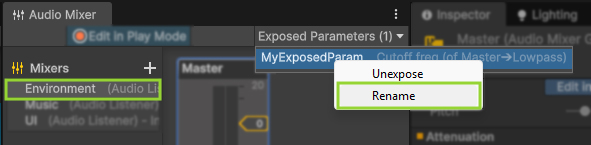
- Rename the parameter to
UnderwaterCutoffFrequency(exactly!)
Scene setup
- On your Underwater Area component(s), assign the previously created Audio Mixer

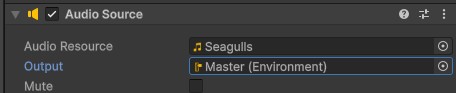
- On any environmental Audio Source components, assign the mixer as the output. These will then be affected by the Lowpass effect.
 Was this helpful?
2 of 2 users found this section helpful
If you're familiar with this asset, please consider leaving a review!
Your support is what makes complementary updates possible!