
Stylized Water 3

6.1.Transparency Sorting

Transparent materials in Unity are usually not sorted on a per-pixel basis because they typically lack depth information. This is a general limitation of all transparent shaders, including water shaders.
This applies to:
- Transparent materials (water/particles/etc).
- Sprites.
- UI elements
- Custom shaders without a DepthOnly pass.
Unity determines the rendering order of these materials using the following criteria:
- Pivot point distance from the camera
- Material’s render queue value (called “Priority” in URP shaders)
- “Order in Layer” (used by certain components like Particle Systems and Canvases)
These factors decide which material is drawn in front of others. This behavior is built into Unity and applies to both orthographic and perspective camera setups. For more information, refer to Unity’s official Transparency Sorting documentation (also applies to 3D).
Refraction
The refraction features make use of the Opaque Texture URP renders. As the name implies, this texture represents the screen’s image right after opaque geometry is drawn but before transparent materials are rendered (including water).
Because of this, transparent materials aren’t captured in this texture, thus can’t be refracted.
Disable it (Underwater material section) if you want traditional transparency behaviour where other transparent materials are visible behind the water (based on its color opacity).
Controlling Transparency Layering:
- Increase the Priority value on the transparent material to push it in front of others (including water). As a last resort, enable Alpha Clipping to force the material to be treated as opaque in sorting.
- Set the Render Queue on the water material (under the “Rendering” tab). For example:
- Use 2999 to render behind most other transparent materials.
- Use 3001+ to render in front of others.
Particle Systems
Particle System renderers use the “Order in Layer” value (found in the Rendering module) to determine their draw order relative to other transparent objects.

World-Space Canvases
For world-space UI, Unity uses the Canvas’ “Order in Layer” to determine draw priority.
- Higher values render on top.
- Lower values render behind other transparent objects.
Depth Writing
Alternatively, turn on the “ZWrite” option on the water material, found under the “Rendering” tab.
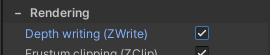
ZWrite ON: Transparent materials will properly intersect with the water (as long as they’re on the same render queue). Parts above the water are visible, whilst the submerged parts are not.
ZWrite OFF: Transparent materials are sorted based on their position, order in layer and the material’s render queue (labeled “Priority” on URP’s particle shader). They will either render behind or in front of the water.
 Was this helpful?