
Spline Mesher - Pro

1.1.Upgrade guide

Updating from Standard to Pro?
The Pro version is technically a completely new asset, and a major upgrade. Though it is possible to upgrade projects with likely very little touch-up work needed!
Migration Tool
In a project with both Spline Mesher Standard (1.4.0+) and Pro installed a migration tool becomes available.
After completion, there is no perceivable difference in the generated geometry!
• Ignore Knot Rotation, Pro version has controls per axis. If enabled, the Z-axis rotation will be disabled. But this is not always the correct assumption (eg. the rollercoaster supports in the demo scene).
• Pivot Offset, made obsolete in Pro. Instead, an alignment can be set for the Input Mesh
• Conforming “Terrain Only” checkbox. No longer available in Pro (technical constraint)
1. Access it through the Spline Mesher Pro -> Migration Tool menu
If you do not see this, make sure you are using v1.4.0+
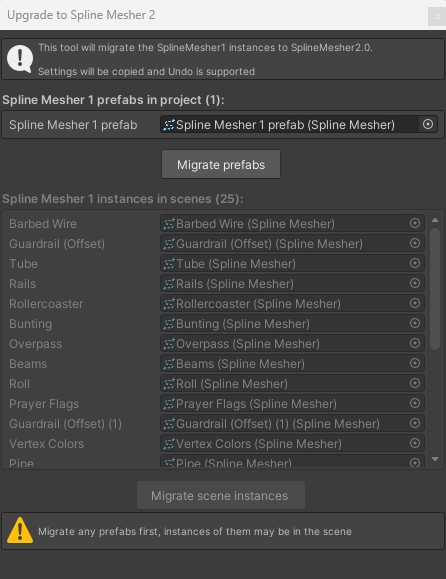
2. Convert any prefabs first
You can also migrate a specific Spline Mesher instance through this content menu option
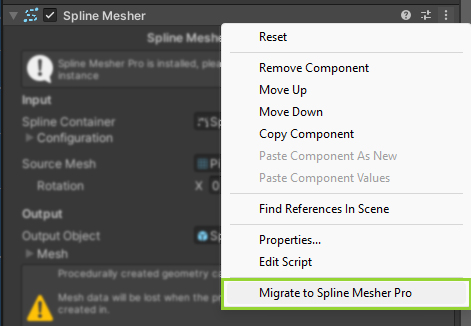
3. Migrate any scene instances. Verify if everything is in order, then save the scene.
4. Repeat 3 for any other scene containing spline meshes.
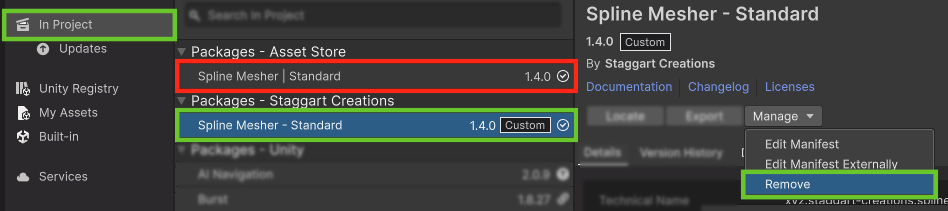
5. Delete Spline Mesher Standard through the Package Manager
API Changes
If you’re using Spline Mesher with custom scripts updating them after removing Spline Mesher Standard will be rather straightforward.
- The namespace used has changed from sc.modeling.splines.runtime to sc.splinemesher.pro.runtime.
- The
Spline Mesherclass is now a base class. The oldSpline Meshercomponent is now theSpline Curve Mesherclass. - The component still has a
Rebuildfunction and asettingsinstance - The
Deformationsettings class no longer exists, it has been split up intoScaleandRotation.
Updating from Preview to Release version
You’ll need to delete the preview version entirely before importing the release version from the Package Manager.
Many things have been restructured, making it likely settings and configurations will be lost.
 Was this helpful?