
Spline Mesher - Pro

6.Troubleshooting/FAQ

Mesh generation
Curve Mesher: mesh turns out garbled, with missing triangles This is attributed having the “Keep Quads” option enabled in a mesh’s import settings. For input meshes used for the Spline Curve Mesher component this needs to be disabled
Curve Mesher: when segments are very long, the mesh appears corrupted For the mesh generation, a 16-bit format is used to store the triangles. As opposed to 32-bit, this has wider platform compatibility (eg. Android) and benefits from higher performance. If a mesh segment exceeds 65.535 triangles, then 32-bit is required. A conversion is done from 16- to 32-bit, but this incurs some precision loss, causing a few triangles to appear linked to the wrong vertices. Ultimately the use of 16-bit is a design choice for performance and compatibility and accounts for the majority of use cases. Solution: Use shorter segments to keep it under 65k triangles.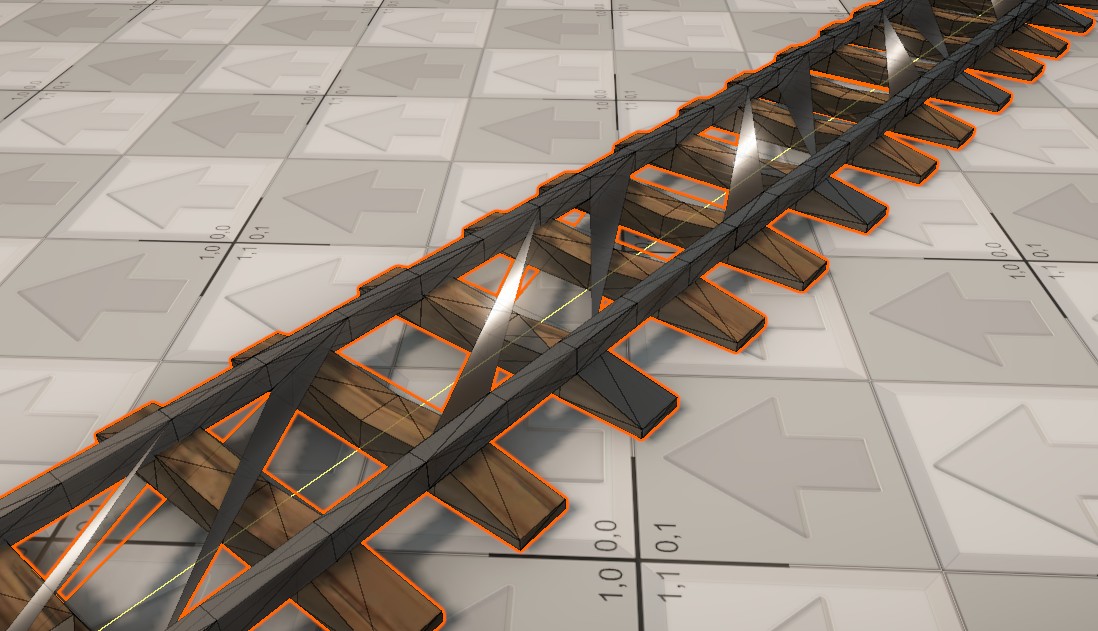
No mesh is created from a spline, nothing appears to happen If the spline is shorter than your input mesh is, or the mesh is larger than a spline’s length: no geometry can and will be created. Try making the spline longer.
Mesh is invisible when a prefab is loaded into the game Procedural meshes are always stored within the scene they are created in. Creating a prefab from a procedural mesh results in the data being lost. For prefabs, meshes need to be save to a file instead. Solution: Use the “FBX Exporter” package and export the spline mesh to an FBX, then drag that mesh onto the prefab’s Mesh Filter instead. Delete the Spline Mesher component to avoid it being overwritten again! Fallback solution: Enable the “On Start()” option on the “Rebuild triggers” dropdown, this will regenerate the mesh the moment the prefab loads.
In narrow corners the mesh appears to be malformed While this is an unwanted effect, it is technically normal. The mesh gets repeated along the spline curve’s length. But in very tight corners many vertices can end up overlapping. Mesh generation that collapses edges (of a cube) on the inside of corners is a very different concept to what this tool does.
When using Conforming, the terrain appears through the mesh This is perfectly normal and expected because the spline mesh and terrain have a wildly different topology. Increase the “Height Offset” parameter to push the vertices up slightly. For a Preventing terrain from appearing through something like a road involves a modified shader (stencils or depth-offset). This is outside of the bounds of what this documentation covers.Fill Mesher, it’s recommended to disable Shadow Casting (Renderer tab) so that the gap is not noticeable.
Colliders
Failed to create Convex Mesh from source mesh. An internal unspecified error has occurred that could mean the Quickhull algorithm found the input mesh topologically challenging. Only crops up if the “Convex” option is enabled. Very annoying, and unfortunately not something that can be resolved. The error in question is indeed “unspecified” and doesn’t provide any indication of what’s wrong with the mesh. The error might occur some times, and when moving the spline just a tiny bit, it might not. Solution: Ensure the output segments are not too short. This error is typically thrown when the individual colliders are short and simplistic. Using longer segments ensures this is not the case.
Error: Physics.PhysX cleaning the mesh failed This is the physics system telling you that the mesh collider is broken. This happens if the generated mesh is invalid for some reason, usually hard to achieve on purpose. For example, scaling the mesh to 0 or trimming it completely results in a mesh with 0 vertices, which is invalid.
Editor
When creating spline meshes the scene file size increases conciderably While this is an unwanted effect, it is technically normal. The generated meshes are saved along with the scene and may end up being large. Traditional meshes are saved to disk as a OBJ or FBX file. Having it “embedded” into the scene file does not directly have any adverse effects except for loading time efficiency. Spline Mesher Pro already uses an optimized vertex layout, reducing file sizes by 50% compared to simpler tools.
Runtime issues (build)
In a build no (collider) mesh is being created For imported meshes (eg. FBX files), be sure to enable the “Read/Write” option in the import settings. This a requirement for meshes used in a build. For C# generated meshes, mark the mesh as readable when creating it.
⚠️ Console warnings
Leak Detected : Persistent allocates X individual allocations. If you’re seeing this it’s unintentional. This means the mesh generation process did not complete entirely and was unable to clean up after itself. If you go to ‘Preferences > Jobs > Leak Detection Level > Enabled With Stack Trace‘ the message will be thrown again the next domain reload (eg. altering a script). After which the full stack trace will be logged in the console. If you are able to report this log message in full, I’ll be able to deduce how it occurred and work towards a fix or at least offer an explanation.
SendMessage cannot be called during Awake, CheckConsistency, or OnValidate (Mesh Segment #0: OnMeshFilterChanged) This is a limitation of Unity’s component system. You cannot perform any actions from an Awake or OnValidate function that will trigger a Spline Mesher component to rebuild.
❌ Console errors
Unsupported conversion of vertex data (format 3 to 2, dimensions 4 to 4) This would normally be a bug, but if you’ve updated from a version older than 1.0.9 then this error will be thrown once when rebuilding Spline Meshers created in an older version. Suggestion: Go to Window->Spline Mesher->Project Settings and click the “Rebuild All” button. This will rebuild all instances and gets the error out of the way. This generic error may be also thrown when MeshLOD processes a spline mesh. I’ve brought this up before, so hopefully a fix lands in a future Unity version. Ironically, the LODs are created just fine!
The Unity.Collections.NativeArray has been deallocated, it is not allowed to access it If you’re seeing this, it’s a bug and completely unintentional. Please report it (with the full error log) so it can be addressed!
Destroying GameObjects immediately is not permitted during physics trigger/contact, animation event callbacks, rendering callbacks or OnValidate. You must use Destroy instead. This is a limitation of Unity’s component system. You cannot perform any actions from an Awake or OnValidate function that will trigger a Spline Mesher component to rebuild.
CollisionMeshData couldn't be created because the mesh has been marked as non-accessible. When using the Spline Mesher component at runtime, or in a build, the assigned input mesh must be readable. For imported meshes (eg. FBX files), be sure to enable the “Read/Write” option in the import settings. For C# generated meshes, mark the mesh as readable when creating it.
InvalidOperationException Burst failed to compile the function pointer <...> The version of the Burst package in your project was updated to a newer version. Restart the editor to complete the update. There was a pop up dialog that instructed to do the same, it meant it 😉
Error: The name 'ftRenderLightmap' does not exist in the current context Cause: You had Bakery installed at one point and removed it from your project. In order to completely remove it, also remove the “BAKERY_INCLUDED” scripting define symbol from your project (Unity manual)
LibraryPackageCachecom.unity.collections@2.6.2Unity.Collections <...> You’ve imported this asset into a Unity 2021 project anyway. This prompted the installation of the Collections v2.6.2 package, which is strictly incompatible with this version. Delete the asset and downgrade the Collections package to a compatible version. You will need to upgrade to Unity 2022.3.23f1+ to use this asset (as noted on the asset store).
 Was this helpful?