
Preview
Asset is in development, documentation is a draft
3.1.1.Setup

Creating a new Curve Mesher
Go to GameObject->Spline->Curve Mesh
Next, assign a Spline Container or click the “Create” button to add one
Converting a Mesh to a Spline Mesh
Any input mesh you use is expected to already be correctly set up for use in Unity. See the Mesh Preparation section.
On any Mesh Filter component, you can access a quick set up option under the context menu:
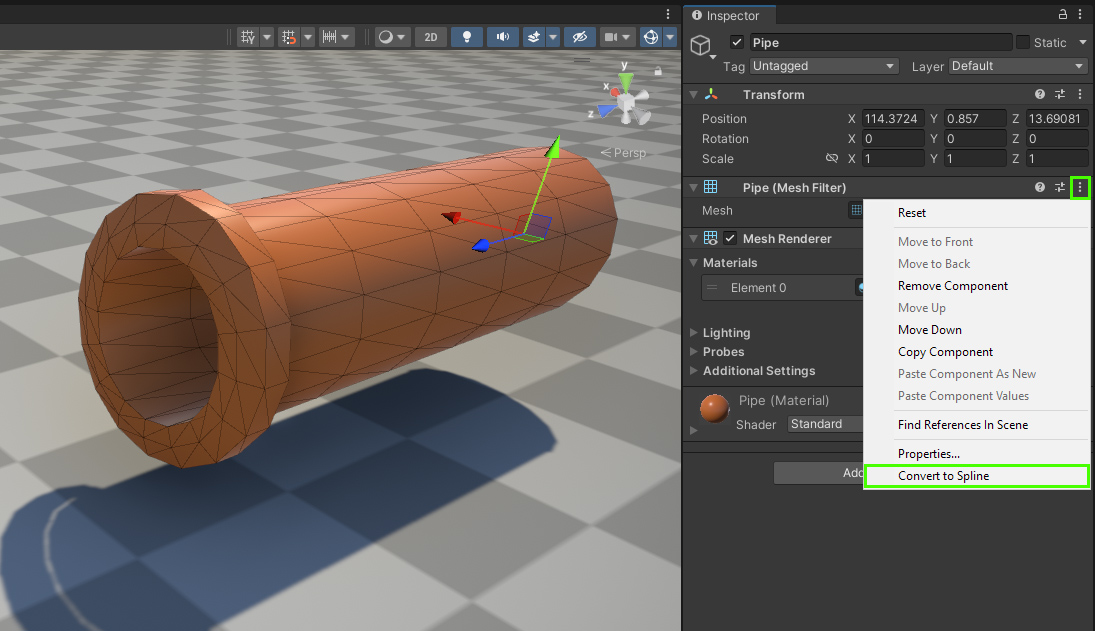
You can also add the
Spline Curve Mesher component manually to any other object.Converting a Spline to a Spline Curve Mesh
On a Spline Container component, you can access the “Add Curve Mesher” option.
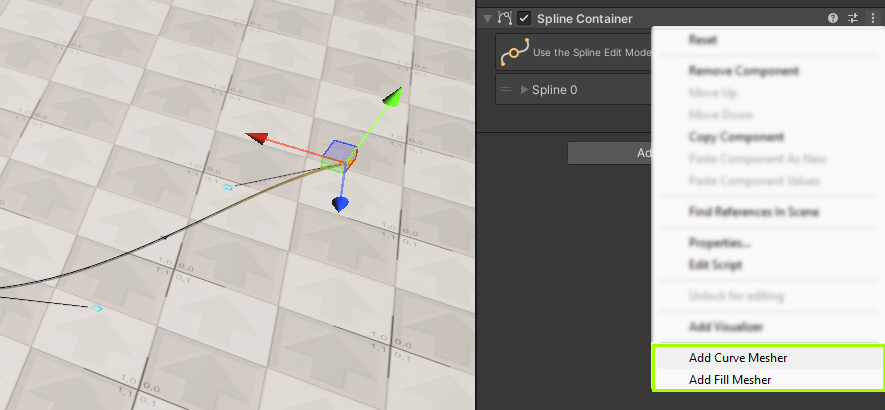
Mesh editing
With the new spline mesh created, you’ll already notice that the geometry reacts to the Spline’s shape as you adjust it. This is the crux of the workflow, but the component holds various others settings outlined on the Spline Mesher Component page.
Notes:
- The
Spline Curve MesherandSpline Containercomponents do not necessarily need to be on the same object. Neither does theRoottransform! - Scaling the
Spline Containerobject is supported, but this only yields correct results if the Target Object is entirely separate. Otherwise you’re also scaling the created mesh objects.
 Was this helpful?
0 of 0 users found this section helpful
If you're familiar with this asset, please consider leaving a review!
Your support is what makes complementary updates possible!