
Preview
Documentation is a draft, and is expanded as the package develops.


5.Spline Proccesors

These components take an existing spline as input and produce a new altered spline as an output. In many procedural content creation software this input Spline is called the “control spline”.
Any one of them can be added to a Spline Container through the dropdown menu:
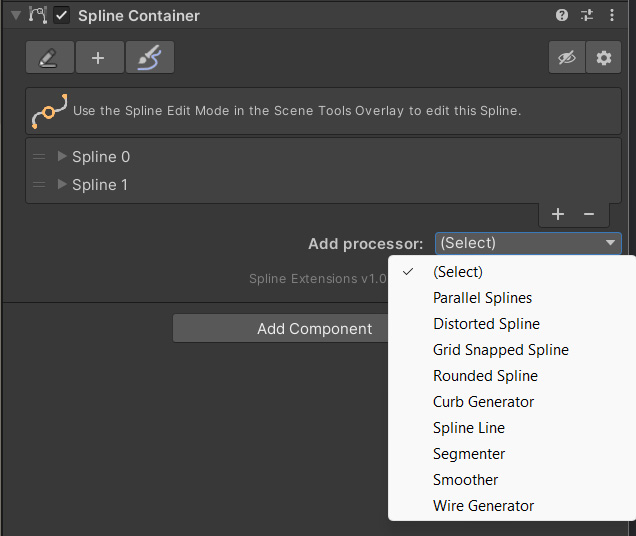
Using this dropdown will create a new child object, with the component added.
The component creates a new Spline Container, to store its output in. It will appear grayed out, to avoid accidentally manual changes (which would be overwritten again)
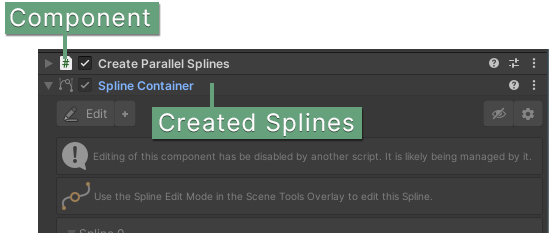
Should you wish to edit the component any way. You can use the “Unlock for Editing” context menu option on it.
Trigger Event
Processor components have a Trigger Event dropdown. It determines when the component should react to spline changes and execute its behavior.
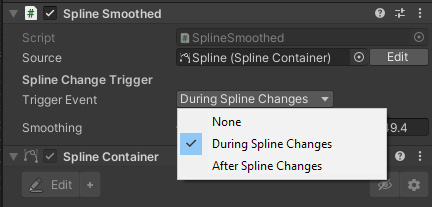
You may want to opt to choose “After Spline Changes”, so that a component only executes once the Source spline has finished being altered. Rather than constantly.
When choosing the “During Spline Changes” option, changes will be visible immediately, but Editor performance may degrade, as a Spline could be changed many times within a few milliseconds.
If it is set to “None”, a button will appear to trigger an update manually.
 Was this helpful?