
Stylized Grass Shader (Unity 6)
5.4.Controlling wind

Normally, the wind settings are controlled on a per-material basis. The related settings can be found under the “Wind” section:
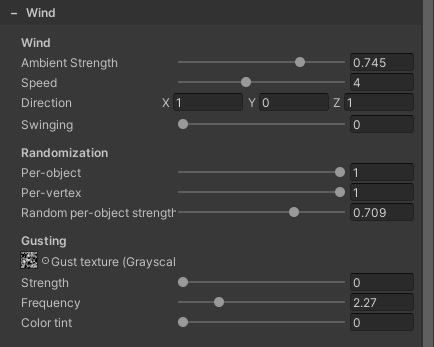
All the parameters have tooltips. Mouse over to view a description
Wind Controller
It is however possible to use a Wind Zone to influence the strength/speed values for wind. On a Stylized Grass Wind Controller component, you’ll find the option to assign one:
You can create such a component through GameObject/Effects/Grass Wind Controller
Once a Wind Zone has been assigned,
- The “Main” parameter value will act as a multiplier for the Ambient Strength and Gusting Strength parameters on all grass materials.
- The “Turbulence” parameter is a multiplier for just the Gusting Strength/Speed.
- The wind direction will be set based on the Wind Zone’s forward vector (blue arrow)
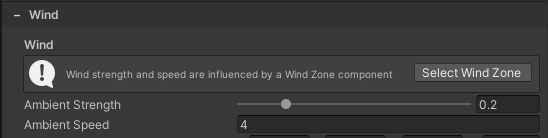
If in effect, a notification is also displayed in the material UI:
Enviro & COZY
If either of these assets are installed and is set up in the scene, then the component will fetch the wind parameters from their systems. A notification will be displayed if that is the case.
A Wind Zone component is then not necessary.
Usage notes
- You can also use the static
sc.stylizedgrass.runtime.WindController.SetWindZone()function to assign a specific Wind Zone reference. - It is recommend to set the wind to its maximum strength (or activate a storm-like weather profile), then fine tune the wind strength on all grass materials to look right for this situation. This is to ensure that you know how the grass will behave under extreme circumstances.
 Was this helpful?