
Stylized Water 3

4.2.1.Align Transform To Water

This component makes a Transform to align the water surface, useful for decorative elements.
It does so by sampling the water’s height at 4 points in a ➕-shaped pattern. From these points, a normal vector is also derived, which in turn is used to rotate the transform.
The component makes use of the Height Query System.
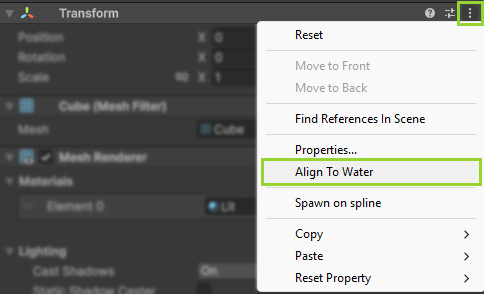
You can quickly set this up for any Transform through the context menu:
You can also use this component, on an empty GameObject, to easily get the water surface height at a given position, for instance:
- As an anchor for a swimming character
- To keep a particle effect snapped to the water surface.
- Measure how high something is hovering over the water
- Faking buoyancy by attaching a Spring Joint to it
- If a Rigid Body is attached to the same object, the script uses
RigidBody.MovePositioninstead of setting the Transform directly. Note that gravity will be disabled for it. Otherwise gravity will attempt to pull down the object, creating a constant tug war between the Physics and Transform domains! - This script alters the transform’s Y-rotation, so it cannot be modified by anything else, except through the “rotation” parameter. The X/Z position of the transform can be changed freely by other actors.
- The term “Buoyancy” is purposely never used to describe this component, since no physics are involved and shouldn’t be expected.
 Was this helpful?
2 of 2 users found this section helpful
If you're familiar with this asset, please consider leaving a review!
Your support is what makes complementary updates possible!