
Pro Version upgrade
Spline Mesher 1.0 has become Spline Mesher Standard. An upgrade discount to pro is available.

4.2.Adjust rotation roll

A per-point roll can be added through the editor, which is accessible here:

Once enabled, data points can be added. Represented by yellow circles, which can be rotated using a mouse drag

This is particularly useful for rollercoasters.
Procedural roll
Under the “Deforming” section, you can add a procedural rotation roll to the mesh, allowing it to twist around the curve.
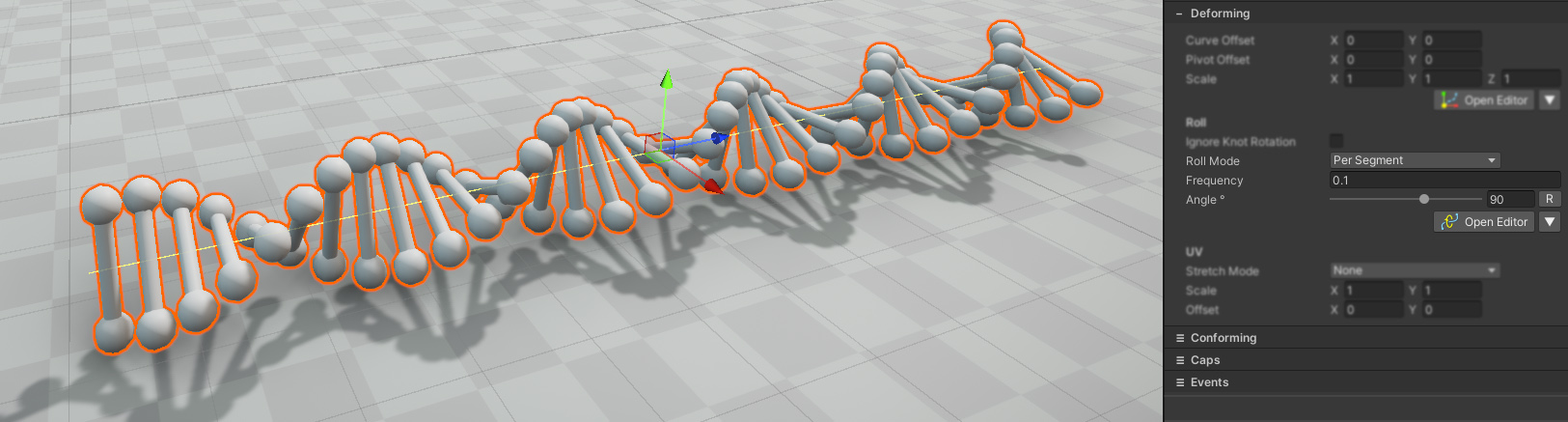
This adds a constant rotation to the entire mesh.
Hint: Set the frequency to 0, and the mesh completely rotates around the Spline’s axis.
 Was this helpful?
0 of 0 users found this section helpful
If you're familiar with this asset, please consider leaving a review!
Your support is what makes complementary updates possible!