

3.Update Guide

From 2.4.1 to 3.0.0+
Version 3 is a completely reworked asset from scratch which means it contains fundamental changes.
Upgrading straight from the Built-in RP to URP will not be possible. It would be required to use this asset from scratch either way
Core changes:
- The asset has been renamed to “SC Screen Effects”, as the term “post effect” is less in line with current terminology.
- The asset is now in the UPM format and installs as a native package, it no longer sits in the “Assets” folder
- Script namespace has changed from “SCPE” to “sc.screeneffects.runtime”
- Some effect parameter names have changed, this only affects custom scripts previously accessing them.
- Every effect now has a main “intensity” parameter.
With upgradability in mind, a migration utility is included that can do most of the grunt work.
No all parameter settings/values cannot be migrated. So effects may need to be reconfigured.
Migration steps
Step 1
Go to Window->SC Screen Effects->Migration Utility
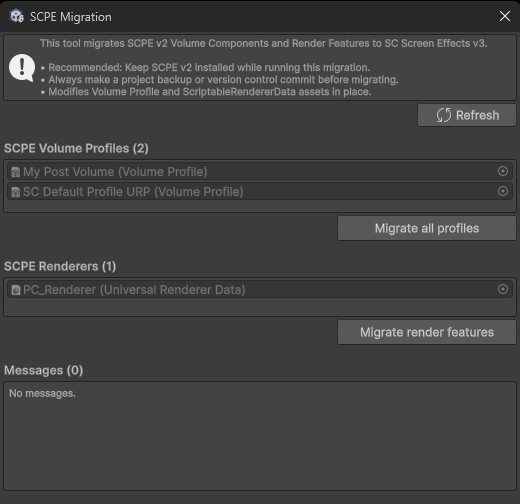
Step 2
Migrate any profiles and render features
Step 3
Observe the results and validate if everything is working as expected.
Reconfigure any effect settings as needed.
Step 4
Delete the old “SC Post Effects” folder
 Was this helpful?

0 of 0 users found this section helpful
If you're familiar with this asset, please consider leaving a review!
Your support is what makes complementary updates possible!