
Building the world of Lake: Vegetation
Rendering & placement
The world was quite large, and placing/painting all the vegetation by hand would have been a tremendous chore. Given the fact that the terrain was being iterated on quite regularly, this would have meant redoing the vegetation placement on those areas every time. All in all, hardly acceptable or desirable.
A few months before the start of the project I was getting familiar with the Vegetation Studio asset, that had just released. As someone who’s involved with vegetation and terrains a lot, it proved to be a game changer. Unity’s native vegetation system is so woefully outdated that it wouldn’t stand a chance. So I decided to dive into the beta, head first and adopt it for Lake from the start.
It’s major strength is that it offers a rule-based procedural spawning system. For example, trees will never spawned on slopes with an angle higher than 50 degrees, certain terrain layers, or within predefined masks (eg. the lake, on roads, or residential areas). A bonus is that it generates tree billboards automatically, meaning low details versions are rendered in the far distance. Giving the impression of a mass forest.
The viability of vegetation growing somewhere in nature is also governed by a set of rules (albeit infinitely complex), which I tried to closely approximate. Epic Games took an interesting approach by implementing a simulation algorithm, which definitely left an impression!
[Video of spawning rules]Whenever the terrain was synced from World Creator, vegetation would automatically be respawned and aligned itself to the updated terrain.
Distribution control
There was a strong desire voiced to have dense(r) tree lines around roads, both for the visual result and to somewhat funnel the player. Performance-wise this wasn’t achievable, due to the increased amount of instances, overdraw and vertex count. Increasing the vegetation density affected the world in general, not just along roads. Luckily, Vegetation Studio had the ability to modify a vegetation item’s spawn chance, based on a texture map value.
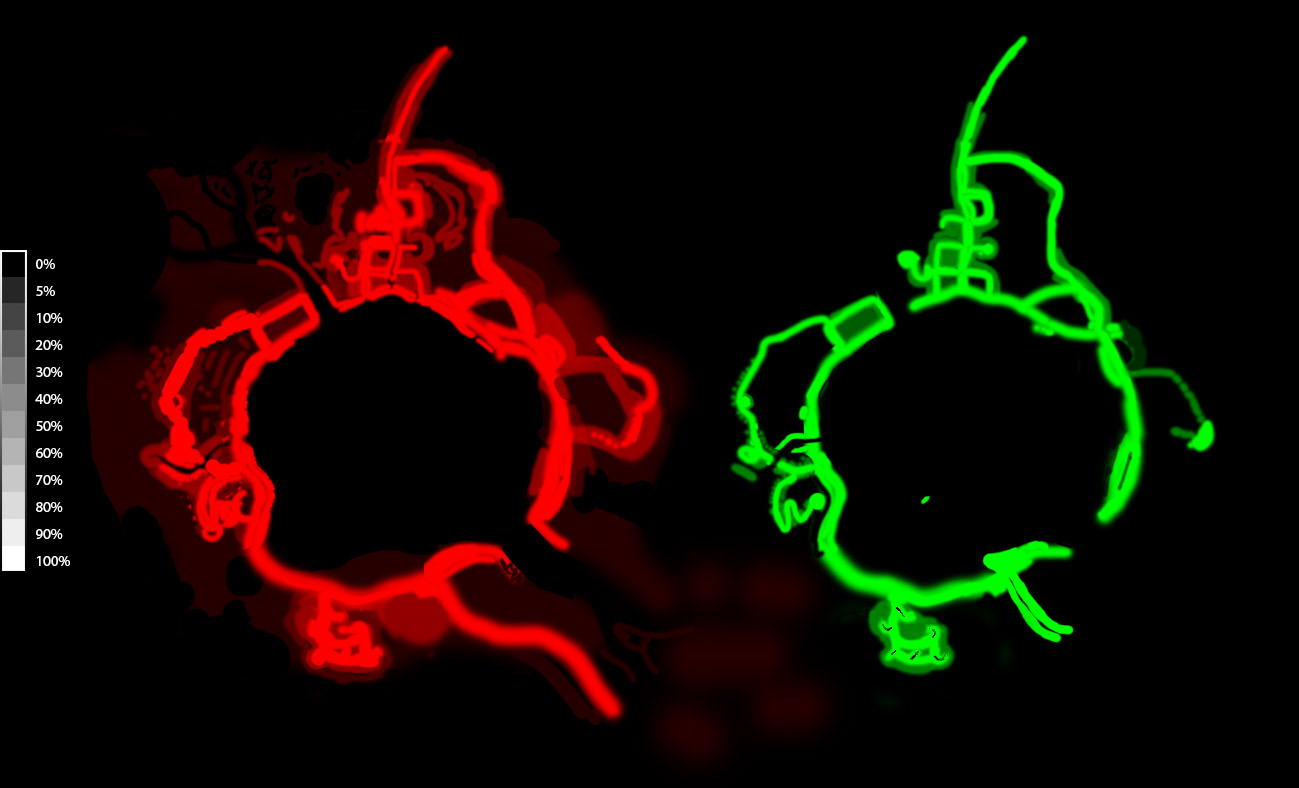
This prompted the creation of a “density map”, which allowed to specify the vegetation density at any point in the world. Vegetation spawning was tuned to represent the highest possible density, after which a 100% value was painted around the roads. 5% representing a base value, where only mature Douglas fir trees spawn, which was mostly used to cover the terrain areas visible in the distance. Some vegetation items only spawned if the density was 50% or higher. Grass being one of them, this only spawns around roads or otherwise easily accessible areas.
In the end, this provided noticeably denser vegetation. Where sparse vegetation away from the roads would visually become obscured and hardly noticeable. Seeing as areas that remained largely unseen no longer had any vegetation, a welcome performance boost was also the result. A double win!
Manual placement
Particularly for the residential areas of the world, dressing up lawns and gardens required to meticulously place certain vegetation models by hand. Vegetation Studio does support painting vegetation items manually. It has the option to bake down all the spawning data, so it doesn’t have be performed at runtime. The painting functionality adds instances to the same data set.
The problem with this is when reverting back to runtime spawning, in order to make adjustments to spawning rules, all these painted items would also be cleared.
To work around this, and allow non-destructive manual control, the baking functionality was modified. Instead of taking only the spawned instances, and adding them to the data set. It also looked for any “VegetationMarker” components in the scene.
This component simply has a reference to a certain vegetation prefab. With this known, it could also be baked using the object’s position/rotation/scale. The result is that it gets injected into the vegetation system, while the object itself is never actually loaded into the game.
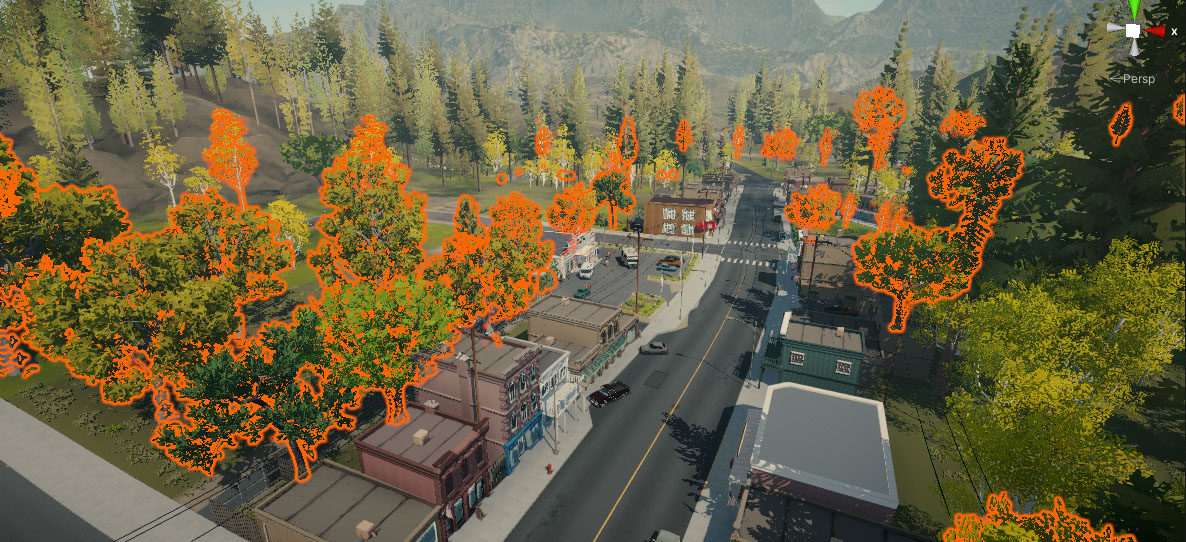
Eventually around 2000 individual vegetation markers were scattered across the world.
Vegetation could have been rendered as regular GameObjects in the scene, though this doesn’t benefit from the already existing vegetation system.
Optimization
Vegetation Studio