
SC Screen Effects is now available
Originally released in 2018, SC Post Effects has helped bring more than 18,000 projects to life. Over the years, it grew from a collection of post-processing effects into a versatile toolbox for creating everything from subtle visual enhancements to stylized, gameplay-driven effects.
But the Unity rendering landscape has changed considerably since then.
A fresh start for Unity 6
With Unity 6, Render Graph became a central part of URP’s rendering architecture, fundamentally changing how custom rendering passes are implemented and integrated into the pipeline.
Continuing to maintain the existing architecture while introducing a completely separate Render Graph implementation would have meant carrying forward much of that complexity. Supporting the Built-in Render Pipeline, older URP versions, VR and the new rendering workflow within a single package was no longer a sustainable direction.
It was time to draw a line under SC Post Effects and start fresh. This created an opportunity to rethink the asset itself, and rip of some bandaids, and set it up for the years to come.
Eight years of free updates, countless compatibility challenges, performance optimizations and user feedback had provided a wealth of experience. Instead of simply porting the existing effects to a new API, the goal was to also reassess how they should work, where their implementations could be improved, and which features still made sense in modern Unity projects.
The result is SC Screen Effects: a completely new asset, built specifically for Unity 6 and URP, using the Render Graph framework. It’s effectively version 3.0.
And the list of improvements is long.
Here’s what’s new in version 3.0.0
Three new effects
Motion Trails
Create smooth visual trails from moving pixels that exceed a configurable luminance threshold. It’s a lightweight alternative to conventional motion blur, particularly useful for stylized visuals, fast-moving objects and enhanced motion feedback.
Anaglyph 3D
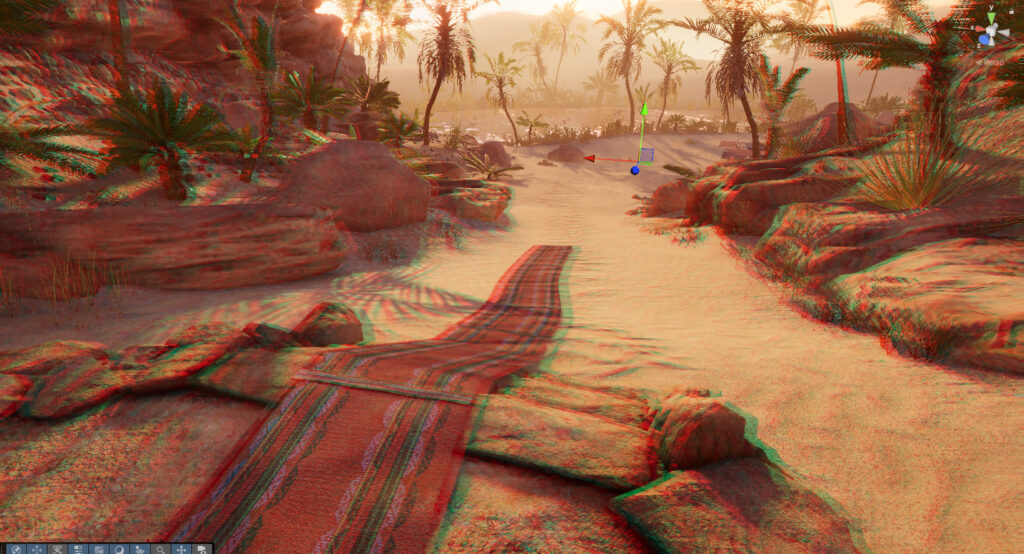
Introduce stereoscopic depth perception by rendering a scene for color-filtered 3D glasses. A distinctive effect for experimental visuals, retro presentations and projects that call for an unconventional perspective.
Condition
Blend an animated texture or color into the edges of the screen to communicate gameplay states, environmental hazards or other visual cues. Eight included prefabs provide ready-to-use starting points.
New components
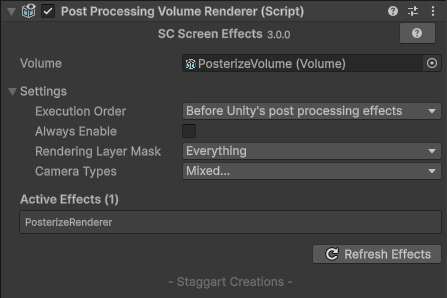
- Post Processing Volume Renderer, grabs all the effects from the attached Volume and injects them into rendering. No render features needed!
- Post Effect Mask, converts and Mesh into a Rendering Mask for effects.
- Custom Effect Renderer, allows you to create your own effects using a custom Shader Graph.
Timeline support
Included is a dedicated Post Processing Track that allows specific volume profiles to be activated and blended in a Timeline
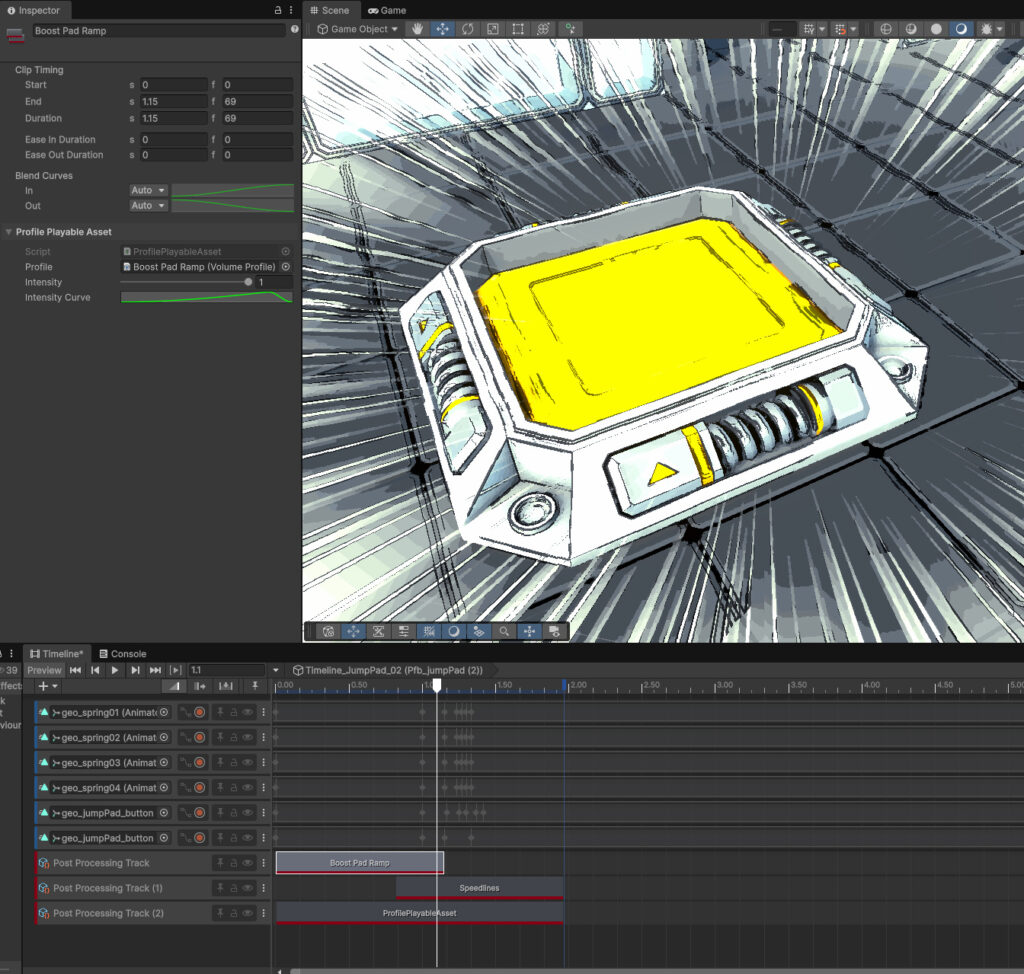
This makes creating distinct cutscenes or sequences a breeze!
Improvements across the collection
- Effects no longer require a separate intermediate copy pass, reducing the rendering work needed to produce their results.
- Sunshafts have received significant performance optimizations.
- The Kuwahara effect has been optimized, including improved depth-fade behavior that correctly reduces its impact to zero when fully faded out.
- Ripples now use a displacement texture instead of procedural noise, delivering better performance without a discernible visual difference.
- Height fog now uses 3D noise, eliminating the streaking artifacts previously visible on vertical surfaces.
More consistent results
- Blur, Edge Detection and Tilt Shift now behave more consistently across 720p and 2160p resolutions.
- Effect parameters have been standardized around an Intensity parameter where applicable, making the collection more consistent and simplifying volume blending.
- Animation speeds can now be adjusted smoothly at runtime, rather than being limited by the previous parameter behavior.
Greater control over individual effects
Several effects have received new parameters and more flexible workflows:
- Sunshafts: Support for light color temperature, a configurable temperature shift, and an option to cast shafts from a specific point instead of relying on the brightest areas of the skybox.
- Scanlines: An option to define the number of lines independently of screen resolution.
- Fog: A standard Gradient field replaces the previous gradient texture, alongside an option to invert height fog.
- Ripples: A spherical projection mode keeps displacement consistent regardless of camera rotation.
- Transitions: A new Softness parameter, plus Linear, Shutters, Star and Circular transition types.
- Double Vision: An angle parameter and a more flexible Edge Mask parameter replace the former dedicated Edge mode.
- Colorize: A range parameter lets you remap the input so the entire color gradient can be utilized.
- Radial Blur: A configurable Sample Distance automatically determines the number of iterations based on blur length.
- Edge Detection: Separate controls for the influence of depth, normals and color differences.
- Sketch: A revised implementation with independent controls for light and dark thresholds.
Sunshafts have also been updated for full VR compatibility, and the light color and intensity controls now use linear influence sliders.
A more focused collection
Some effects have become redundant thanks to functionality now available directly in URP, while others are better implemented using existing rendering features or were rarely used.
As a result, several effects have been removed:
- Lens Flares: URP provides a native lens flare solution in Unity 2022.3 and later.
- Danger and Speed Lines: Replaced by the more flexible Condition effect.
- Caustics: Better implemented using decals, light cookies or overlay materials, which can provide greater performance efficiency.
- Cloud Shadows: Better handled by animated light cookies integrated with native lighting and shadowing.
- Ambient Occlusion 2D: Removed after never seeing any use or mention.
These changes help keep the collection focused on effects that benefit from a dedicated screen-space implementation, rather than duplicating functionality already provided by Unity.
Moving forward
For existing SC Post Effects users, the new version is a separate asset rather than a direct in-place upgrade. Please consult the documentation’s Upgrade Guide for information on migrating from version 2.4.1.
If you’ve purchased SC Post Effects within the last 6 months, then the upgrade is FREE 🎁
Thank you to everyone who has used SC Post Effects over the years, shared feedback, reported issues and helped shape the asset along the way. Your projects and contributions have been an important part of this!.